Test steps, Gherkin and markers
A status column tells you a test failed. Steps tell you where, and how long it had been running when it got there. This is the whole of the Test Steps tab: the API you write, the Gherkin you already have, and the markers you never wrote down.
What a step is
A step is a named, timed piece of a test. You name it; the reporter times it, files it under the phase it ran in, and nests it inside whatever step was already open. The result is a drill-down: the suite, then a test in it, then what that test actually did, with the slow part drawn as a bar you can see from across the room.
It is a tab of its own rather than a panel inside Test Suites, which is where Allure keeps the same information. The cost of folding it in is a high-level page you can no longer skim, and the high-level page is the one most people open first.
The tab is never empty
Every test has a set up, a body and a tear down. Each of the three is timed from pytest's own report and drawn whether or not anything was named inside it — a phase with no steps still answers where did the time go for a test whose setup is the slow part, and that is exactly the test least likely to have named a step. Alongside the phases, every test carries its markers, its parameters, the fixtures it named and its docstring.
So a suite that has never heard of step() still gets a tree. Naming steps makes that tree deeper; it does not bring it into existence.
Seeing it first
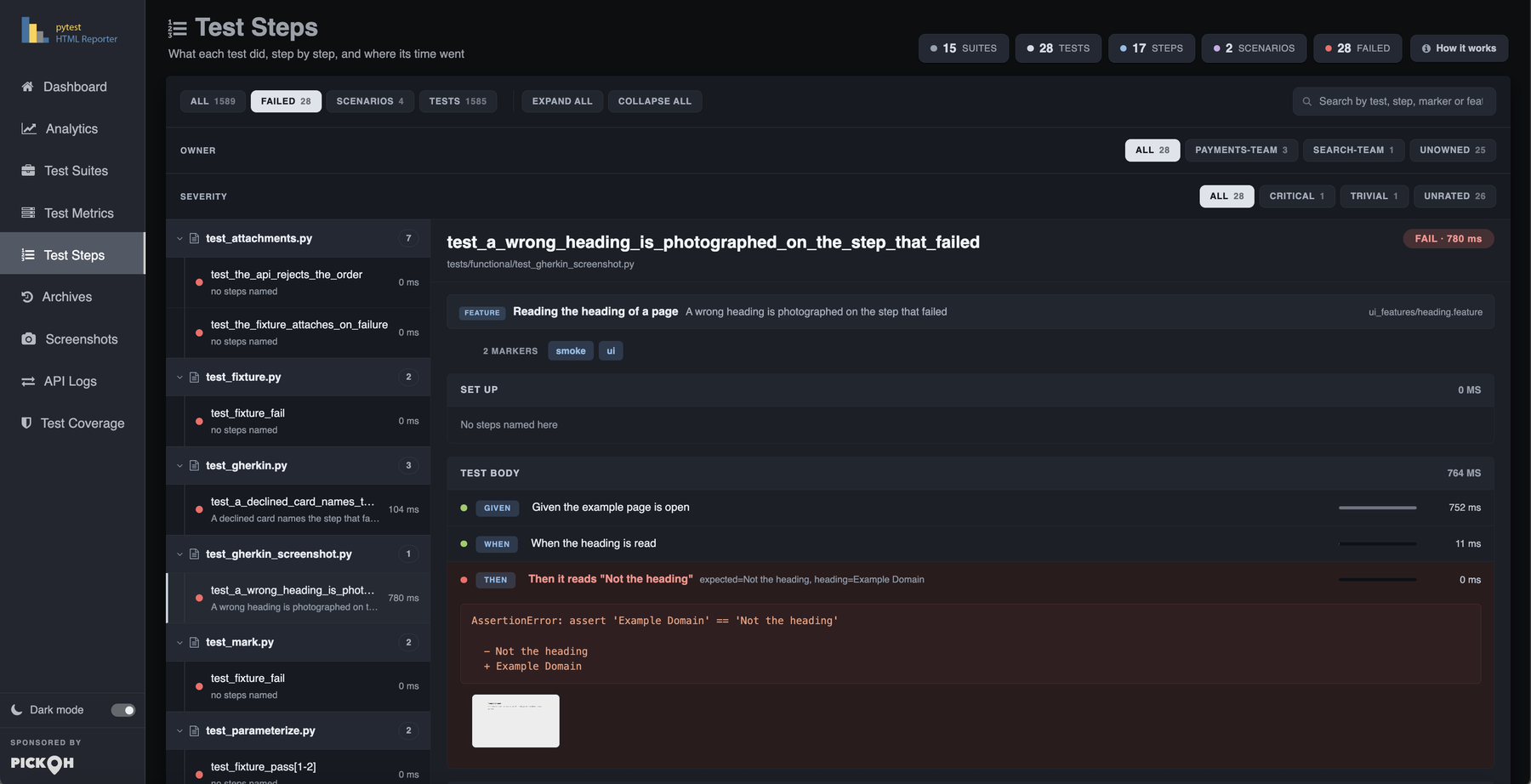
There is a demo suite in the repository that exists for this. It needs no browser and no network — a page object whose methods are the steps, a fixture that sets up and tears down, a parametrized case and a failure buried three steps deep, with sleeps where the work would be.
$ pytest tests/functional/test_steps.py --html-report=./report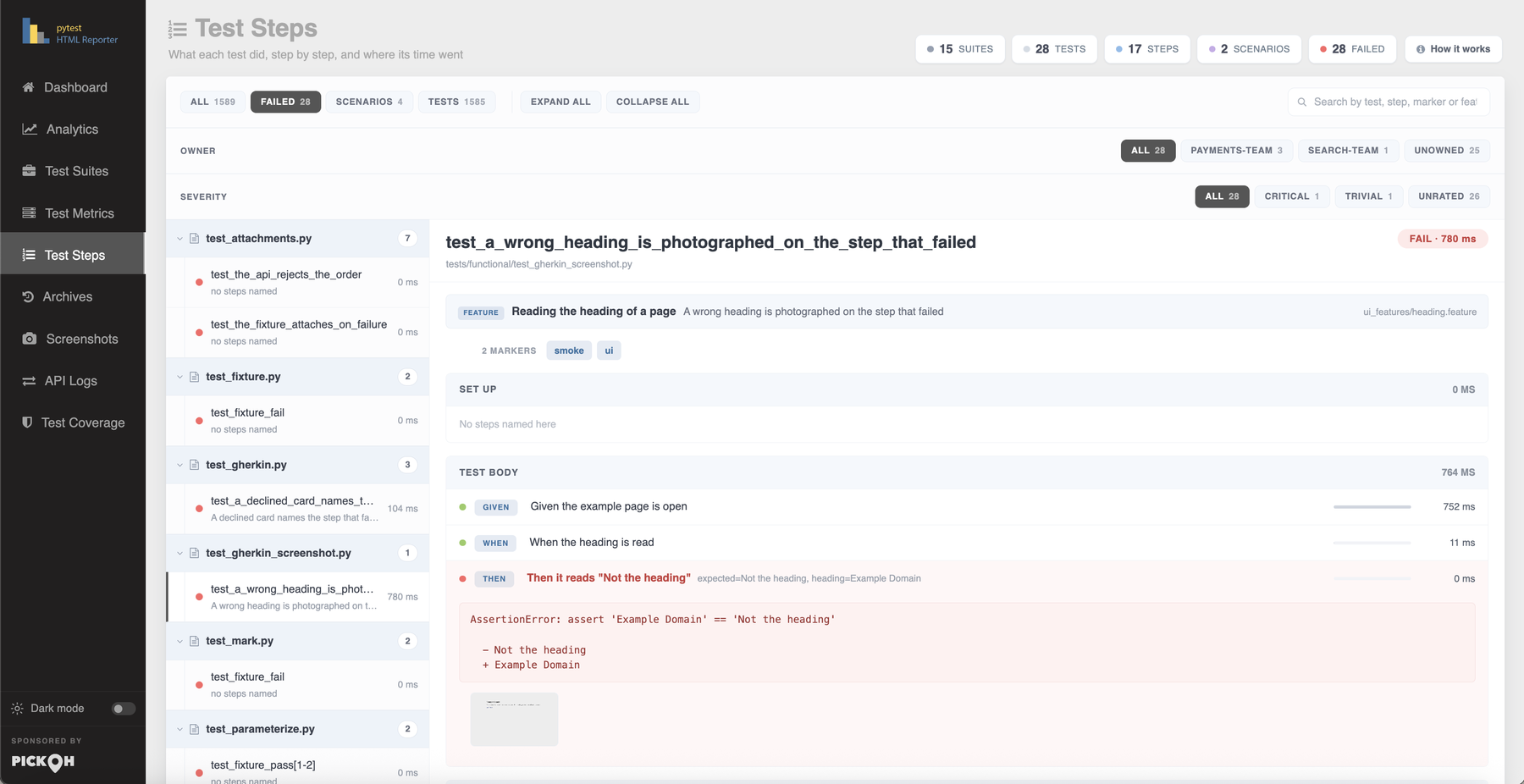
Getting there from a row
The Test Metrics table has a Steps column counting the steps each test recorded. Clicking it crosses to this tab with that one test already open; a test that recorded none shows a dash. The Suite and Test Case cells of the same row are clickable for the same reason — one opens the suite here, the other the test.
The rail has its own search box, matching on the suite, the test, every step title, every marker and — for a Gherkin test — the feature and the scenario. Parameters and error text are deliberately not indexed: they already run to several thousand characters across a run and would roughly double the size of the file for nothing. A test named test_a_declined_card is indexed under that spelling and under test a declined card, because the second is what people type.
Filtering the rail
Above the search box is a row of pills — All, Failed, and, when the run has both, Scenarios and Tests — each carrying its count. A filter that would empty the rail is not offered, and one that was selected before it stopped existing is let go.
From 0.4.1 there are up to three rows, and they answer different questions, which is why they are rows rather than more values on one filter. The second appears once anything in the run carries an owner: one pill per team, counted, busiest first, with an Unowned pill at the end for the tests nobody claimed. The third appears once anything carries a severity, drawn in ladder order — blocker first — rather than by how many tests are at each level, with Unrated last.
Each row counts inside the ones above it. Failed then a team gives that team's failures, and then a level gives that team's blocker failures; the number on a pill is always what the rail will show if you press it. A row is not drawn at all for a run that wrote none of that marker, so a suite using neither sees exactly the rail it had before.
See the report tour for how this tab sits beside the others.
Naming a step
One import, one name.
title is the line the tab shows. Every keyword argument is kept beside the step as a parameter, so the report shows the call that was actually made rather than the sentence it was written from. The same object is both forms: used with with it times the block, used as a decorator it times the function.
from pytest_html_reporter import step

def test_checkout():
    with step("Add to cart", sku="A-12"):
        cart.add("A-12")

    with step("Charge the card"):
        assert gateway.charge(cart).ok
That test reports two steps under Test body, the first carrying sku=A-12. Nothing else changes: step does not swallow exceptions, does not alter the test's outcome and needs no fixture.
Decorating the code your tests share
The methods of a page object or an API client are already the steps of every test that calls them. Decorating them once names all of those tests, and the arguments of the call fill in the {placeholders} of the title. This is the recipe worth reaching for first, because nothing in the tests themselves has to know that steps exist.
from pytest_html_reporter import attach_json, step


class Cart:
    def __init__(self):
        self.items = []

    @step("Log in as {user}")
    def login(self, user):
        with step("Open the login page"):
            page.goto("/login")

        with step("Submit credentials"):
            attach_json({"user": user, "remember": True}, name="Credentials")
            page.click("#submit")

    @step("Add {sku} to the cart")
    def add(self, sku, quantity=1):
        self.items += [sku] * quantity


def test_a_shopper_can_buy_one_item():
    cart = Cart()
    cart.login("amy")          # the tab shows: Log in as amy, with user=amy beside it
    cart.add("A-12")
The arguments are read off the call by name, so {user} is filled from user however it was passed — positionally, by keyword or from a default. self and cls are never shown. A signature that will not bind, because of a decorator stacked in a way inspect cannot follow, costs the title its placeholders and nothing else; and a title naming something the call did not pass keeps its braces rather than losing its name.
Nesting, phases and failures
Steps nest by being called from inside one another
Nothing is passed between steps. A step opened while another is open is a step of it, which is why decorating a helper that itself uses with step(...) gives you a tree rather than a flat list.
A step opened in a fixture stays in its own phase
Steps are filed under Set up, Test body or Tear down depending on when they were opened, and nesting is counted from each phase's own floor. That matters for a fixture that holds a step open across its yield: without the phase floor every step the test body ran would be reported as a step of the fixture — one Open a session swallowing the test that used it.
import pytest

from pytest_html_reporter import step


@pytest.fixture
def cart():
    with step("Open a session"):
        session.connect()

    yield Cart()

    with step("Close the session"):
        session.close()
A step that raises is recorded, and the exception carries on out
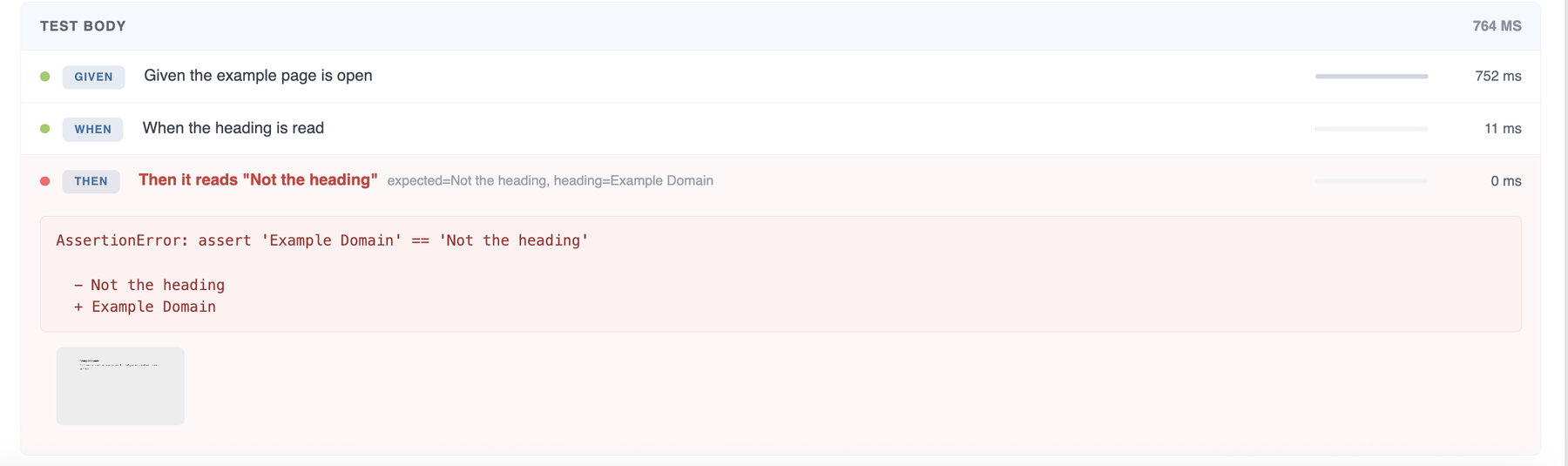
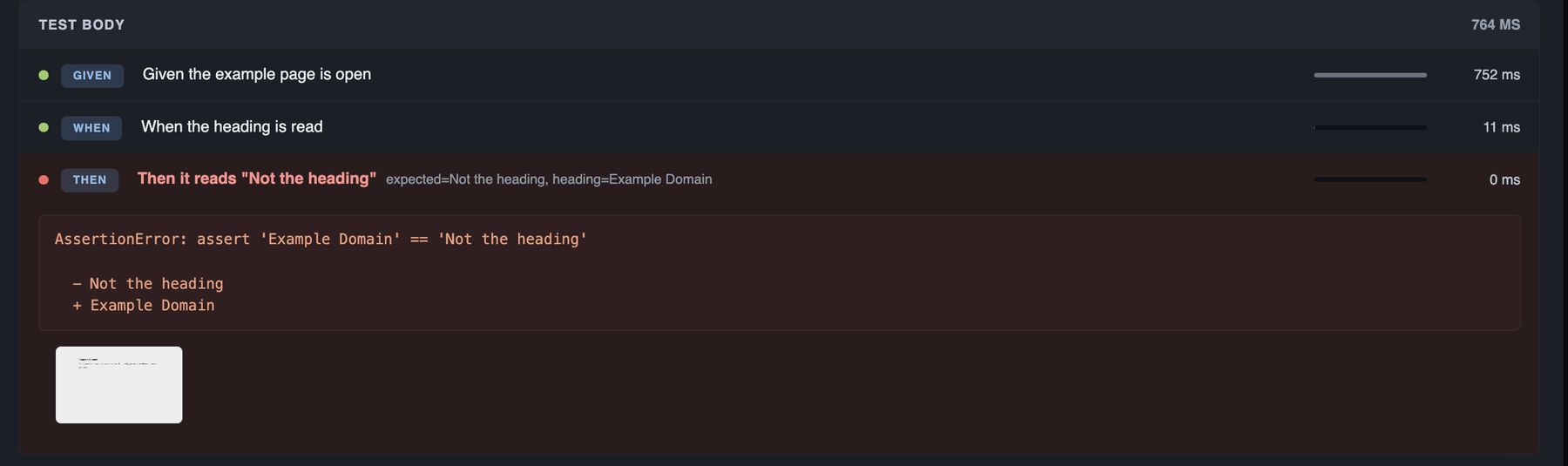
The step is marked failed and keeps the message, up to 2,000 characters. The exception is then re-raised untouched — a report that swallowed a failure in order to describe it would be worse than no report.
The message is kept on the step that actually raised. The steps it was raised inside are marked failed without repeating it, so one exception walking out through four levels is printed once, on the innermost step — the only one that says where — rather than four times with the useful copy furthest down the page.
-
A
pytest.skip()inside a step closes it as SKIP, not FAILIt is not a failure of that step; it is the test saying it should not have run. -
A
withblock that never exited is closed as failedThe test died inside it, and a step that simply stops being mentioned reads as a step that never ran. - The failing test's screenshot is filed on the step that threwThe automatic capture runs from the teardown hook with no step open, so it is attributed to the step the failure came out of — a photograph of the browser at the end of a failing test is a photograph of the state that step left behind. See Screenshots.
- Bars are scaled to the slowest step of that testNot of the run. The question this tab is opened with is always “which part of this test was slow”.
Threads and concurrency
Steps are recorded in the context that ran them, and each thread nests within itself. A test that fans work out to a pool would otherwise have every thread pushing onto one stack, and the steps would come back nested inside each other in whatever order the threads happened to interleave — a tree that never existed. A background thread's steps land at the top level, where they belong.
Until 0.4.1 that was only half true: the stack was per-thread and correct, but the tab rebuilt the tree by reading depths straight down the buffer, so five threads interleaving their steps into one list drew a tree nobody could follow — the right depths under the wrong parents. Every step now records the step it is a step of, and the tab walks that instead.
Anything attached lands on the step
attach_json, attach_api, attach_text, attach_file and attach need no extra argument to say which step they belong to. Whatever step is open when they are called is what they are filed under, and that step shows a paperclip with the count.
with step("Submit credentials"):
    attach_api(requests.post(url, json=payload))
This is read rather than passed, because attach_json is called by code that has no idea a report exists. An image attached inside a step is shown on that step as a thumbnail; a picture belonging to no step is shown against the test body, which is where a test with no named steps ran. The helpers themselves are documented in the Python API.
Steps in an async test
step works in an async test the way it always has in a sync one. Nothing has to be installed and no setting turns it on — pytest-asyncio, anyio and trio are all driven the same way. This is why setup.py now declares python_requires=">=3.7": the machinery is contextvars.import asyncio
import pytest
from pytest_html_reporter import step
@step("Notify {user}")
async def notify(user):
await mailer.send(user)
@pytest.mark.asyncio
async def test_checkout_notifies_everyone():
async with step("Charge the card"):
await gateway.charge(cart)
# Three legs, run together. They come back as three siblings.
await asyncio.gather(notify("amy"), notify("bo"), notify("cy"))async with was a TypeError before this — the object had no __aenter__ at all — so the only spelling that worked was a plain with block inside the coroutine.
@step on an async def was worse than unsupported before 0.4.1: it reported a failing step green. Calling an async def only builds a coroutine, so the wrapper closed the step on that — nought milliseconds, PASS — and the work ran, and raised, long after the step said it had finished. It is now timed across the call, and a step that raises is recorded failed with its message. If a suite of async tests has been showing instant passing steps, that is what it was.Work run concurrently comes back as the siblings it was
Steps used to be kept on a per-thread stack, and asyncio runs every task on the one thread: three gathered legs pushed onto that one stack and came back nested three deep inside one another. The stack is now a ContextVar holding an immutable tuple. A task starts from a copy of the context that created it, which is what keeps a leg nesting under the step that fanned it out while keeping its own steps to itself; the tuple is replaced rather than edited, because a mutable one would be the same list in every task and nothing would have changed.
- Each leg keeps its own children. Steps are buffered as they open, so three concurrent legs all go in before any of their children do; a list read straight down the page would indent every one of those children under the last leg.
- An attachment made inside a leg is filed under that leg.
attach_json,attach_apiand the screenshot capture say nothing about which step they mean, and answering off a shared stack put a picture taken in one leg on whichever sibling happened to be open. - A step left open by a cancelled task is closed rather than left behind. Its context is gone and no stack can be asked, so every open step is registered as it starts and swept at the end of the test — a step that just stops being mentioned reads as a step that never ran.
- A step held open across a
yieldin an async fixture closes where the fixture resumes. pytest-asyncio drives each half of an async generator on a task of its own, so the block is entered in one context and left in another; it is closed on the frame it is holding rather than off a stack that never saw it, because a fixture that worked perfectly must not be reported as the place the test died. - A pooled worker thread that leaked an open step no longer indents the next test underneath it. The thread is handed on still holding whatever it was left with, and the stack it carries names steps that have already been taken and rendered.
- Threads are unaffected by the move. A new one starts from an empty context, so a background thread's steps still land at the top level rather than under whatever the main thread had open.
Cucumber and Gherkin, with pytest-bdd
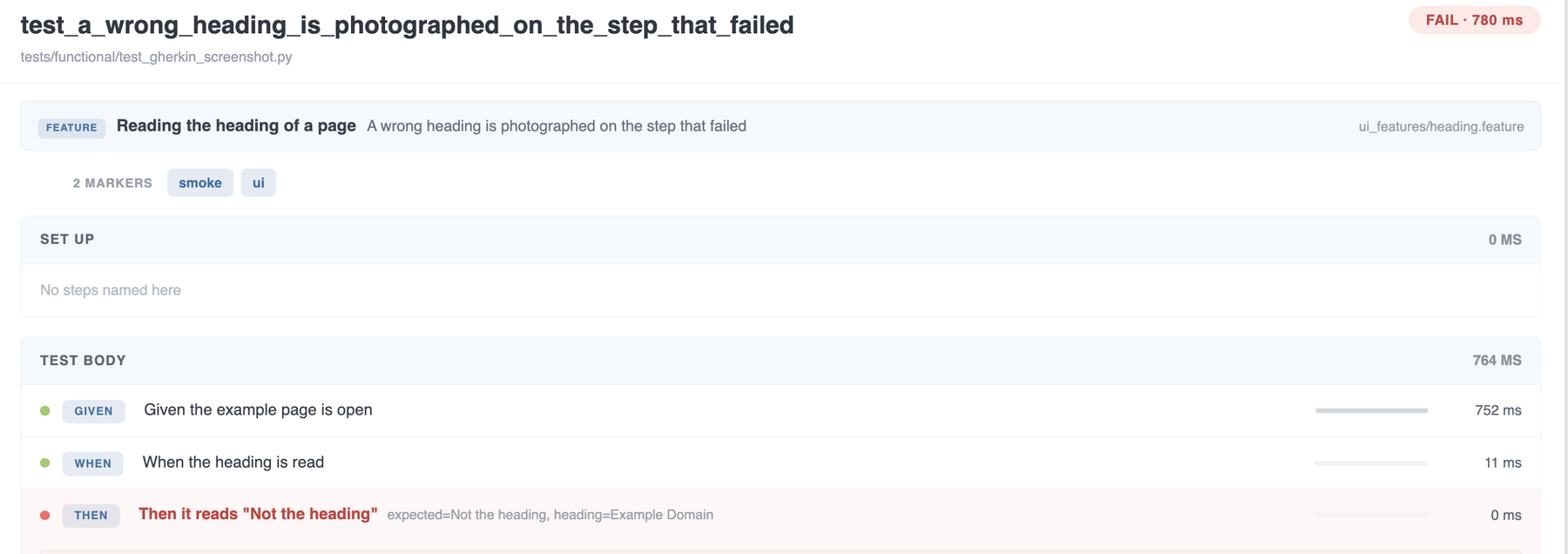
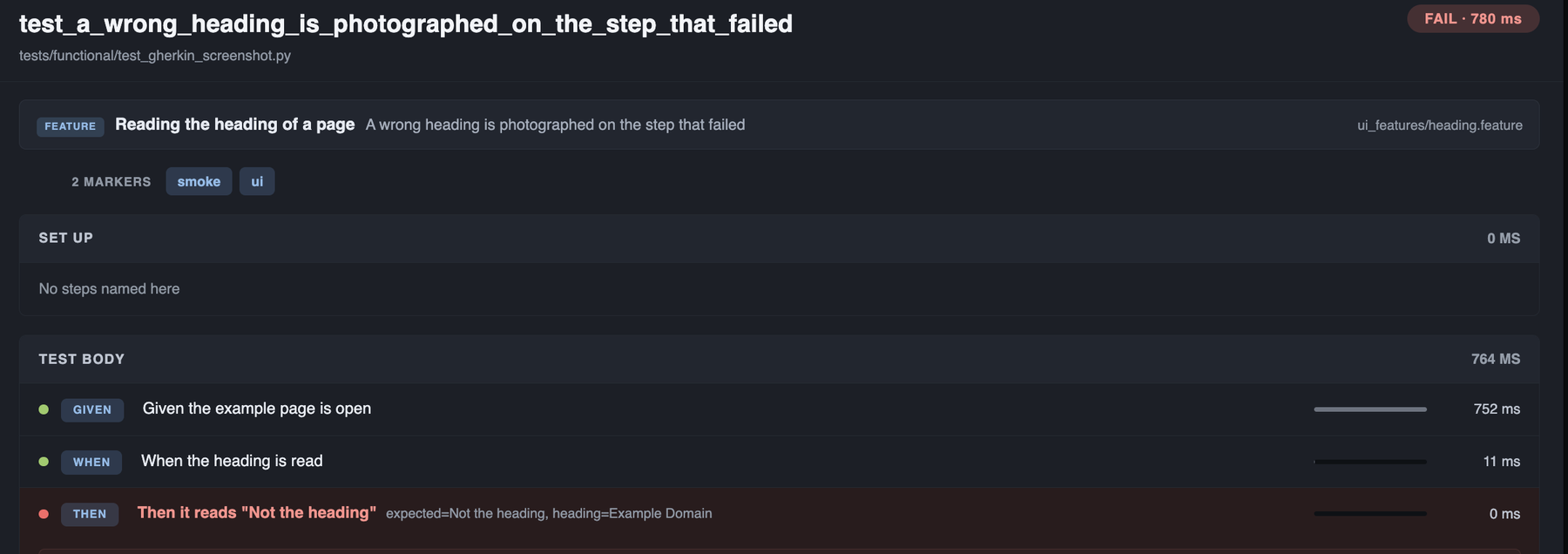
Nothing to do. A pytest-bdd scenario is already a list of named steps — it is the one style of test that arrives already broken into named pieces — so its Given / When / Then reach the tab on their own. Each is timed, each carries what its parser pulled out of the line, and each is badged with its Gherkin keyword so a specification never reads as somebody's plumbing.
pytest-bdd does not have to be installed. Every one of the hooks is declared optionalhook, because pytest does not warn about a hook nobody registered and does not skip it — it refuses to start, with PluginValidationError: unknown hook 'pytest_bdd_after_step'. A run without pytest-bdd is untouched.The feature file
@smoke @checkout
Feature: Checking out a basket

  Scenario Outline: A shopper buys <count> of an item
    Given a logged in shopper
    When they add <count> of "A-12" to the basket
    Then the basket holds <count> items

    Examples:
      | count |
      | 1     |
      | 3     |

  @declined
  Scenario: A declined card names the step that failed
    Given a logged in shopper
    When they add 1 of "DECLINE" to the basket
    And they check out
    Then the basket holds 0 items
The step definitions
Nothing here mentions the reporter.
from pytest_bdd import given, parsers, scenarios, then, when

scenarios("features")


@given("a logged in shopper", target_fixture="basket")
def _shopper():
    return []


@when(parsers.parse('they add {count:d} of "{sku}" to the basket'))
def _add(basket, count, sku):
    basket += [sku] * count


@when("they check out")
def _check_out(basket):
    if "DECLINE" in basket:
        raise AssertionError("card declined by the gateway")


@then(parsers.parse("the basket holds {count:d} items"))
def _holds(basket, count):
assert len(basket) == count$ pytest tests/functional/test_gherkin.py --html-report=./reportWhat the tab then shows
| On the page | Where it comes from |
|---|---|
| A strip above the tree | The feature name, the scenario name and the feature file's path as the run saw it — a pytest-bdd test function is generated, so its own name and module say far less about it than the feature does. |
Given / When / Then badge | The keyword as it was written — And and But keep their own word rather than being resolved to the one before them. |
| The step line | The keyword and the line from the feature file, timed like any other step. |
| Parameters on the step | What the parser pulled out: count=3, sku=A-12. The fixtures pytest-bdd injects alongside them — one for every target_fixture the scenario has built up — are left out, or Then the basket holds 3 items would arrive with the whole basket printed beside it. |
| An Outline's placeholders | Already filled in with the row that actually ran, so When they add <count> of "A-12" arrives as When they add 3 of "A-12". |
| The Examples row | Shown as the test's parameters — count = 3 — unwrapped from the single dict pytest-bdd passes it in. |
| Tags | The scenario's own and the feature's, merged and sorted, arriving as markers. Both @smoke and @declined show against the second scenario above. |
| A step nobody implemented | Recorded and marked failed, so the tab names the line of the feature that has no step function rather than simply stopping short of it. |
The rail lists a BDD test under its scenario name rather than a step count, and the search box matches the feature and the scenario as well as the step lines — so typing a feature name finds every test in it.
Markers, and where they were written
Markers are shown in full — including the ones a test never mentions. A module-level pytestmark, a marker on the class, one added by request.node.add_marker while the test was running: all of them, each saying which scope it came from, which is the answer when nobody remembers applying it.
They are read off the item at teardown, the only moment that sees the whole picture: a marker added during the test is not there at collection, and a parametrized case does not know its own values until it has one.
import sys

import pytest

pytestmark = pytest.mark.regression          # every test in this module


@pytest.mark.smoke                           # every test in this class
class TestCheckout:

    @pytest.mark.skipif(sys.platform == "win32", reason="POSIX paths only")
    @pytest.mark.parametrize("quantity", [2, 5])
    def test_a_shopper_can_buy_several(self, cart, request, quantity):
        """A parametrized case keeps its own row and its own steps."""
        request.node.add_marker(pytest.mark.flaky(reruns=3))   # added while it ran

        cart.add("B-7", quantity=quantity)

        assert len(cart.items) == quantity
The quantity=2 case of that test reads like this on the tab:
| Fact | Badge | Scope reported |
|---|---|---|
| Description | A parametrized case keeps its own row and its own steps. | — |
| 5 markers | parametrize(quantity) | function |
skipif(reason=POSIX paths only) | function | |
flaky(reruns=3) | function | |
smoke | class | |
regression | module | |
| 1 parameter | quantity = 2 | — |
| 1 fixture | cart | — |
The scope is whichever node the marker was found on, walking out from the test: function, class, module, package or session. A marker written at more than one level is said once — pytestmark = pytest.mark.slow on a module whose class repeats it is one badge, not two — but tier("unit") and tier("slow") both stay, because they are two different things to say.
pytest's own markers are coloured apart from yours
skip, skipif, xfail, parametrize, usefixtures and filterwarnings get a badge of their own colour. That is not a style choice: those six change how a test is run, while @smoke only names it, and the two read very differently on a badge.
Two are cut down deliberately
parametrizeshows its argument names, not its rows. The marker carries every row the test will ever run with — a hundred of them for one badge — and this case's own row is already shown as its parameters. So you getparametrize(quantity)and aquantity = 2beside it.- A
skipifcondition is evaluated at import.sys.platform == "win32"reaches any reporter as a bareFalse, which says nothing, so the reason is shown instead:skipif(reason=POSIX paths only). Askipifwritten with a string condition keeps that string.
Two markers the plugin gives a meaning to
owner and severity are collected like any other marker, but they answer questions the rest of the row does not — who do I tell and how bad is this — so each gets a row of its own, a row of filter pills on the rail and a panel on Analytics. Both need no configuration at all, and both are registered with pytest, so --strict-markers accepts them and no run prints PytestUnknownMarkWarning for them.@pytest.mark.owner("payments-team")
@pytest.mark.severity("blocker")
def test_a_refund_reaches_the_ledger():
...-
owneris shown ahead of the tags, in a row of its ownBurying it in a row wheresmokeandslowcatch the eye answers neither question. A test can carry two, and both are kept: picking one would quietly take a team off the hook for a test they had put their name on. -
severityis a ladder, worst firstblocker,critical,normal,minor,trivial— Allure's five words rather than five of our own, because whoever writes this marker has almost certainly written it there, and a vocabulary nearly the same as a familiar one is worse than either. Case is ignored, soseverity("Critical")andseverity("critical")are one level rather than two spellings splitting a suite's counts in half. -
One test, one levelOwners stack; a severity does not. Where two markers claim one test the nearest wins — a class marked
criticalinside a module markednormalis somebody correcting the outer word — and two written at the same scope are read as the worse of them, because reading ablockerdown tominorover the order two decorators sit in is the one mistake here that hides work. - Nothing is hidden by thatThe overridden marker is still shown, struck through beside the one that won, and its tooltip says where each was written — normal, from the module · overridden by critical — which is the answer when a level nobody typed on this test is the one deciding its colour.
-
A test nobody rated is unrated, not
normalAllure defaults an unmarked test; this does not, because a suite where four tests are marked and six hundred are not is a suite with six hundred unrated tests, and drawing them as rated would bury the four. A bare@pytest.mark.severitywith no argument names no level and stays the ordinary badge it is. -
A word outside the five is kept, but sorts lastA filter that silently omits a test is worse than one that shows a typo — but an unrecognised severity is a typo far more often than a sixth level somebody meant, and a typo must not outrank
blocker, so it sorts aftertrivialeverywhere.
A marker holding an id can be a link
A marker holding an issue key has been collected and shown since markers landed, but as a flat badge: nothing in the report knows that PROJ-123 is an issue rather than a word. report_link_pattern is the missing half. One MARKER=URL per line, with {} where the marker's argument goes.
[pytest]
report_link_pattern =
    jira = https://acme.atlassian.net/browse/{}
    testcase = https://acme.testrail.io/index.php?/cases/view/{}
    owner = https://github.com/orgs/acme/teams/{}
docs = https://wiki.acme.dev/testing$ pytest --report-link-pattern 'jira=https://acme.atlassian.net/browse/{}' \
--report-link-pattern 'testcase=https://acme.testrail.io/index.php?/cases/view/{}'-
Ids are grouped under the marker they were written asA Jira row and a Testcase row each say which system their ids belong to, so the badges themselves stay as short as
PROJ-123. A test that closes two tickets gets two badges in one row. -
A template with no
{}is a fixed destinationWhich is whatdocs = https://wiki.acme.dev/testingmeans: the marker's presence links to it. It is not an error and not a placeholder somebody forgot. -
Substituted, not formatted
str.formatreads every brace in a string, and a url is a place people put them, so a templated Confluence link threwKeyErrorinstead of rendering. The id is percent-encoded on the way in, because it is pasted from a tracker and arrives with whatever that tracker allows in one. - Nothing is fetched and no token is neededThe report is a static file that gets mailed, published and opened off a disk months later, and a badge that needs credentials to render is blank in exactly those cases. A url template needs neither, and a dead link at least says so in the address bar.
-
A scheme the report will not render is dropped rather than linked
javascript:,data:— the same sieve--report-linkhas always gone through, and for a stronger reason: this one is built per test out of whatever a marker said. - A marker with no pattern is untouchedSo a suite that configures none of this gets exactly the report it had before, and the markers you do name are registered with pytest from your configuration rather than from a list in the plugin.
Naming a marker here also puts it in the JUnit xml, as a <property> on the testcase — which is the half Xray, Zephyr and TestRail actually read.
Parameters, fixtures and the docstring
- Parameters come from the case, not the markerRead off the callspec, so what you see is the row this test actually ran with.
-
Fixtures are the ones the test namedIts own signature plus
usefixtures— not the whole transitive closure. Asking fortmp_pathwould otherwise puttmp_path_factoryin the list too, and a test that names two fixtures should not read as a test that names nine.requestandpytestconfigare left out, and a parametrized argument is not repeated here because it is already a parameter. - The docstring is the function's ownCollapsed to one paragraph and capped at 400 characters. A class docstring describes the class, and repeating it under every method in it says nothing about any of them.
regression into the rail's search narrows it to every test carrying that marker, at whatever scope it was written.

Keeping the file down
Step trees are held outside the metrics table, so they are never swept into its search box or into the CSV, Excel and print exports. Two flags decide how much is kept at all.
Whose steps survive into the report. all rather than failed, unlike a log: the steps of a test that passed are what a later failure is read against, and they cost a line each.
| Value | What is kept |
|---|---|
all | Every test's steps. The default. |
failed | Only FAIL and ERROR tests'. |
none | No steps — the phases and their timings stay, as they cost nothing. |
How many steps one test can record. A step inside a loop over ten thousand rows would otherwise write ten thousand lines into the page, and the tree stops being readable long before it stops being generated.
The cap is followed by a line of its own saying the rest were dropped — more steps not recorded - raise --report-step-limit to keep them — rather than the tree simply ending, because a tree that stops halfway reads as a test that stopped there.
| Value | Meaning |
|---|---|
500 | 500 steps per test. The default. |
<positive integer> | Steps per test. |
0 | Every one. |
$ pytest --html-report=./report --report-steps=failed --report-step-limit=100--report-steps=failed leaves behind on a retry.Where next
Screenshots
A failing browser test is photographed with no hook and no import, and the picture is filed on the step that threw.
Read morePython API
The six functions in full: attach, attach_text, attach_json, attach_api, attach_file and step.
Report tour
Every tab of the report, what it answers and how it gets you to the next one.
Read more