Python API
Six names come out of the package root and nothing else in the package is public. This page is what each one takes, what it gives back, and where in a test's life you are allowed to call it.
The import surface
Everything a user writes in a test comes from the package root. pytest_html_reporter/__init__.py is seven lines long, and its __all__ is the contract:
__version__ = "0.4.3"

from .attachments import attach_api, attach_file, attach_json, attach_text
from .steps import step
from .util import screenshot as attach

__all__ = ["__version__", "attach", "attach_api", "attach_file", "attach_json", "attach_text", "step"]
Six names and a version string. Import the ones you need, or all of them at once:
from pytest_html_reporter import attach, attach_api, attach_file, attach_json, attach_text, step| Name | Signature | What it is for |
|---|---|---|
attach | attach(data=None) | Hand the report the bytes of an image. See attach(). |
attach_api | attach_api(response=None, …) | A whole HTTP call: both bodies, both header sets, and the curl line that repeats it. |
attach_text | attach_text(data, name=None, format=None) | Free text — a query, a diff, a note. |
attach_json | attach_json(data, name=None) | A dict, list, tuple or JSON document, pretty-printed with credentials blanked out. |
attach_file | attach_file(path, name=None, format=None, redact=True) | The contents of a small text file on disk — a payload, a config, a HAR. |
step | step(title, **params) | Name and time a piece of a test. Documented on Steps & BDD. |
attach_text(), attach_json(), attach_api() and attach_file() arrived together, alongside the screenshots attach() was already taking. step() landed in 0.3.8.Older import paths still work
attach really lives in pytest_html_reporter.screenshots, and pytest_html_reporter.util re-exports it under its historical name screenshot — it was defined there before the automatic captures gave it a module of its own. All three spellings are the same function object, and the package’s own test suite asserts it:
from pytest_html_reporter import attach
from pytest_html_reporter.screenshots import attach
from pytest_html_reporter.util import screenshot

# tests/unit/test_public_api.py
assert pytest_html_reporter.attach is screenshot
Return values
Every attach_* helper returns the attachment record it queued — a plain dict of built-in types — or None when there was nothing to attach: empty text, an empty file, a call with no body, no headers and no curl line. attach() returns None.
The record holds only strings, numbers, lists and dicts because an xdist worker has to pickle the whole thing back to the controller that renders the report. You are free to read it, but nothing in the report needs you to.
__repr__ blows up — each costs the report a field, never the test its run. The single deliberate exception is attach() handed a str.What there is no API for
There is no logging API and no marker API to import. Captured stdout, stderr and logging output reach the report because pytest captures them and the reporter keeps them; markers, parameters, fixtures and docstrings reach it because the reporter reads them off the item at teardown. You write print(...) and @pytest.mark.smoke and nothing else. See the report tour for what that produces, and configuration for the options that narrow it.
attach() — handing the report an image
attach is the explicit half of screenshots. It takes the image, not the browser, so anything that can produce PNG bytes reaches the report: a Selenium driver, a Playwright page, a headless chart renderer, a rendered PDF page, an image diff.
The bytes are decoded with Pillow, buffered with the label attached, and written out as a .png under <report base>/pytest_screenshots/ when the test’s record is built.
from pytest_html_reporter import attach

attach(data=self.driver.get_screenshot_as_png())   # Selenium
attach(data=page.screenshot())                     # Playwright
attach(data=await page.screenshot())               # Playwright, async API
Three things follow from you asked for this picture:
- An image you attach is always kept.Whatever the test did, and whatever
--report-screenshotssays. That option governs the pictures nobody asked for, and this one was asked for — a screenshot of a pass is a baseline, and one on a skip says why it was skipped. - A test that attaches its own image is not photographed again.The automatic capture bails out the moment it sees the running test has already produced an image, so a suite that already has a capture hook keeps exactly the images it always had rather than getting the same page twice.
- It lands wherever it was taken.In the Screenshots gallery, in the
Screenscolumn of that test’s Test Metrics row, and — if astep()was open when you called it — under that step in the Test Steps tab.
What attach() accepts, and what belongs elsewhere
data is the bytes of an image, as any browser or renderer hands them over. That is the only form. Everything else a test might want to hand over has a helper of its own:
| What you have | Call | Why |
|---|---|---|
| PNG / JPEG bytes | attach(data=shot) | Decoded through Pillow and written out as a PNG. |
| A base64 payload | attach(data=base64.b64decode(shot)) | Not an image until it is decoded. Base64 bytes handed straight over reach Pillow and fail there; a base64 string is rejected by the guard below. |
A str of free text | attach_text(data) | See attach_text(). format picks the syntax highlighting. |
| A dict, list, tuple or JSON document | attach_json(data) | Pretty-printed, with credential-looking fields blanked out at any depth. |
| A path to a small text file | attach_file(path) | Read as binary and decoded UTF-8 with replacement, so an odd byte cannot raise. |
| An HTTP response object | attach_api(response) | Taken apart into both bodies, both header sets and a curl line. |
str is rejected on purpose, with a message that names the helper you actually wanted: attach() takes the bytes of an image; to attach text use attach_text(), attach_json() or attach_api() instead. Pillow’s own error — cannot identify image file — says nothing about the mistake now the package also has helpers that do take text.import base64
from pytest_html_reporter import attach
# The bytes of an image, from wherever they came
attach(data=driver.get_screenshot_as_png())
# A base64 payload has to be decoded first
attach(data=base64.b64decode(encoded_shot))
# A rendered chart, an image diff, a PDF page - anything that produces bytes
attach(data=figure_to_png(chart))Two cases that need the explicit call
The automatic capture is synchronous and runs on the way out of the test, which leaves two shapes it cannot cover. Both are ordinary attach() calls.
async def test_home(page):                # Playwright, async API
    try:
        assert await page.title() == "Example Domain"
    except AssertionError:
        attach(data=await page.screenshot())
raiseimport unittest
from selenium import webdriver
from selenium.webdriver.common.by import By
from pytest_html_reporter import attach
class TestClass(unittest.TestCase):
def setUp(self):
self.driver = webdriver.Chrome()
self.driver.get("https://example.com")
def test_heading_mismatch(self):
heading = self.driver.find_element(By.CSS_SELECTOR, "h1").text
self.assertEqual(heading, "Not the heading")
def tearDown(self):
# Before quitting - a closed driver has nothing left to photograph.
attach(data=self.driver.get_screenshot_as_png())
self.driver.quit()attach_api() — a whole HTTP call
A picture is no use when the thing under test is an API. attach_api attaches what went out, what came back, and the curl line that reproduces it, and the entry lands on the report’s API Logs tab with the status code coloured by class and the call’s duration on the badge.
def attach_api(response=None, name=None, method=None, url=None, status=None,
               reason=None, duration=None, request_headers=None, request_body=None,
               response_headers=None, response_body=None, content_type=None,
               redact=True):
Nothing in the package imports requests or httpx. A response is read by duck typing, which is why both work out of the box — and why a client that resembles neither can still be described field by field.
Three ways to call it
1. Hand it a response object. The common case, and the whole call comes out of it.
from pytest_html_reporter import attach_api

attach_api(requests.get(url))                          # requests
attach_api(httpx.get(url))                             # httpx
attach_api(await client.get(url))                      # httpx, async API - the response is passed, not the client
attach_api(httpx.post(url, json=payload), name="Create order")
2. Describe the call by hand. Every field can be given directly, so a call reconstructed from a log — or one made by a client that resembles nothing — still makes a full attachment.
3. Both. An explicit argument always beats the response object, so you can override just the one field the client got wrong — a proxy that rewrote the URL, say.
attach_api(method="POST", url="/orders", status=500,
           request_body=payload, response_body=body, duration=1.4)

attach_api(response, url=upstream_url)         # override just the one field
What it reads off a response
In this order, first hit wins. Every read is individually guarded — response.text decodes the body on access, and a streamed httpx response raises rather than returning it — so an attachment missing one field is worth having where a test failing inside a reporting call is not.
| Field | Read from |
|---|---|
| method | response.request.method |
| url | response.request.url, else response.url |
| status | response.status_code, else response.status |
| reason | response.reason, else response.reason_phrase (httpx) |
| duration | response.elapsed.total_seconds(), else float(response.elapsed) |
| request headers / body | response.request.headers; response.request.body, else .content |
| response headers / body | response.headers; response.text, else .content |
Parameters
| Parameter | Type | Default | What it does |
|---|---|---|---|
response | object | None | Any response object with requests-like or httpx-like attributes. Read by duck typing. |
name | str | METHOD /path | Entry title. Defaults to the method and the URL’s path — the host is dropped because it is the same for every call in most suites and would push the part that differs off the end of the entry. Trimmed to 80 characters. |
method | str | from response, else GET | HTTP method. Upper-cased. |
url | str | from response | Request URL. Credential-looking query parameters are blanked out unless redact=False. |
status | int | str | from response | HTTP status code. Drives the entry’s colour class (2xx / 3xx / 4xx / 5xx) and the Status meta row. |
reason | str | from response | Status text, shown beside the code as 422 Unprocessable Entity. |
duration | float (seconds) | response.elapsed | How long the call took. Rendered as 184 ms under a second and 1.42 s over it; kept in whole milliseconds alongside so the tab’s summary can add the calls up and find the slowest. |
request_headers | dict | mapping | pairs | from response.request | Anything with .items() — a dict, a CaseInsensitiveDict, httpx Headers — or an iterable of pairs. |
request_body | str | bytes | dict | list | from response.request | The request payload. A dict or list is pretty-printed directly; text and bytes are re-serialised only when they really parse as JSON. |
response_headers | dict | mapping | pairs | from response | As request_headers. |
response_body | str | bytes | dict | list | from .text / .content | The response payload, pretty-printed when JSON. |
content_type | str | from the headers | Overrides the Content-Type used to pick each body’s syntax, for the request and the response alike. |
redact | bool | True | Whether credential-looking headers, query parameters and JSON fields are replaced with <redacted>. See credential blanking. |
What one attachment holds
Five parts, in this order: Response body, Request body, Request headers, Response headers, cURL. Parts with no text are dropped, so a GET with no request body simply has no Request body part, and an attachment with no parts at all is never queued — that is the None return.
A meta strip above them carries Method, URL, Status, Time, Size and Content-Type, each when it is known.
Bodies are pretty-printed when they are JSON, however they arrived: a dict skips the round trip, bytes are decoded, and text is re-serialised only when it really parses. Text that does not open with { or [ is not treated as JSON — a body of 123 is technically valid JSON and re-serialising it would be a pointless way of saying nothing. A body that does not parse is kept exactly as it came, so half a response is still readable. Otherwise the syntax is implied by the Content-Type: json, xml, html, yaml, and csv falls back to text.
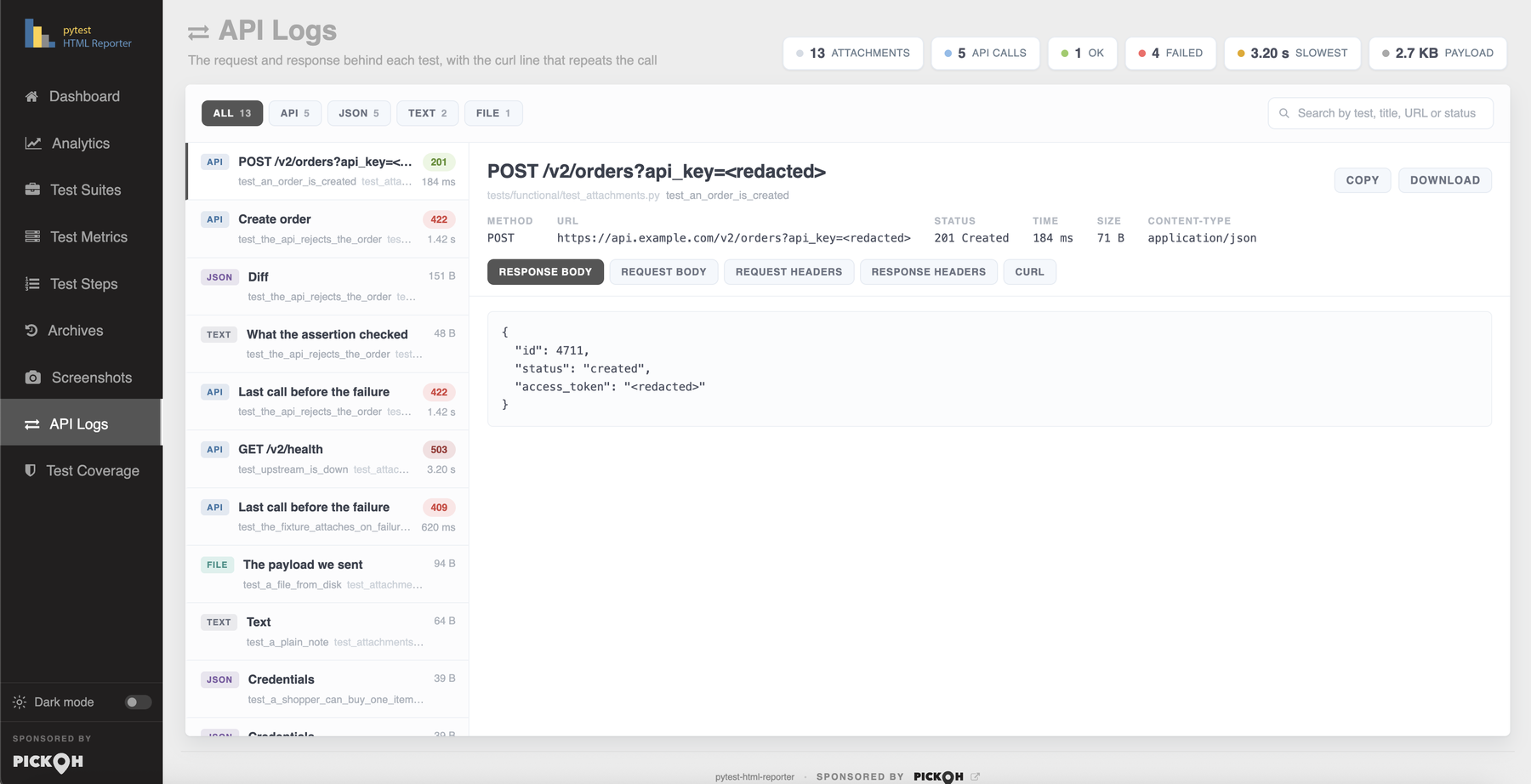
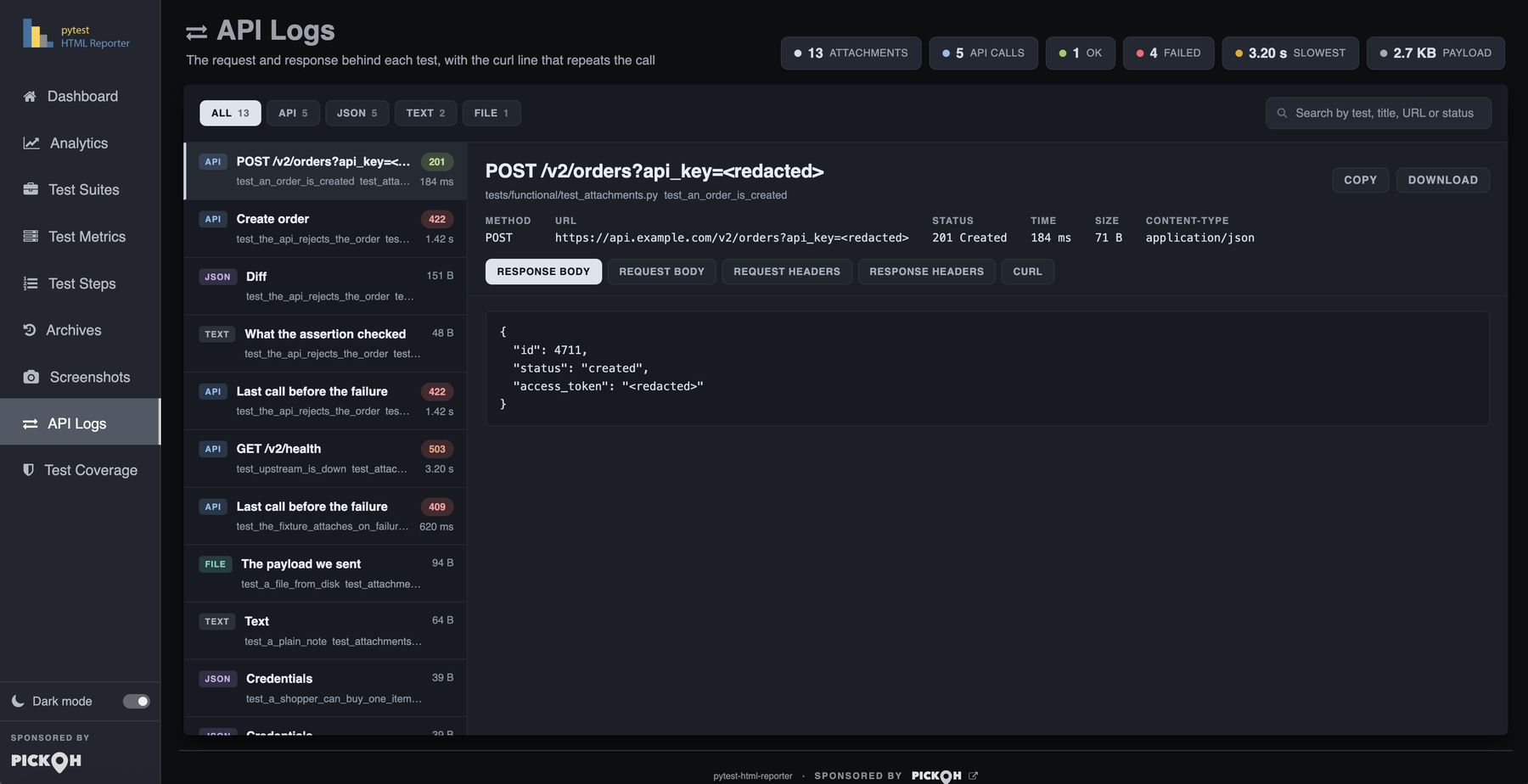
attach_api() call in the report — the rail on the left, the meta strip and the response body on the right.The curl line is the point. Pasting it into a terminal is the first thing anyone does with a failed API call, and rebuilding it by hand from a report is the tedious part. It is built from the already-redacted headers and body, and single quotes inside the body are escaped.
curl -X POST 'https://api.example.com/v2/orders?api_key=<redacted>' \
  -H 'Authorization: <redacted>' \
  -H 'Content-Type: application/json' \
  --data '{"sku": "A-1", "qty": 2}'
A worked example
From tests/functional/test_attachments.py, the demo run that fills the tab with no browser and no network. Three attachments explaining one failure, and a call described entirely by hand:
import json

from pytest_html_reporter import attach_api, attach_json, attach_text

ORDER = {"sku": "A-1", "qty": 2, "customer": {"id": 91, "password": "hunter2"}}


def test_an_order_is_created(api):
    """A call that went fine. Attached anyway - a 201 is a baseline worth having."""
    response = api.call("POST", "/orders", ORDER, 201, "Created",
                        '{"id": 4711, "status": "created", "access_token": "tok_live_31f8"}')
    attach_api(response)

    assert response.status_code == 201


def test_the_api_rejects_the_order(api):
    """The case the tab exists for: three attachments explaining one failure."""
    response = api.call("POST", "/orders", ORDER, 422, "Unprocessable Entity",
                        '{"error": "sku unknown", "field": "sku", "trace": "e91c-44a"}',
                        seconds=1.42)
    attach_api(response, name="Create order")

    attach_json({"expected": {"id": 4711, "status": "created"},
                 "got": json.loads(response.text)}, name="Diff")

    attach_text("SELECT id, status FROM orders WHERE sku = 'A-1';",
                name="What the assertion checked", format="sql")

    assert response.status_code == 201, "the order was rejected"


def test_upstream_is_down():
    """A call described by hand - no response object anywhere in sight."""
    attach_api(method="GET", url="https://api.example.com/v2/health", status=503,
               reason="Service Unavailable", duration=3.2,
response_body="upstream timed out after 3s")$ pytest tests/functional/test_attachments.py --html-report=./reportCredential blanking
A report is a build artifact. It gets published by CI, attached to tickets and pasted into chat, so attach_api, attach_json and attach_file replace anything that looks like a credential with the literal string <redacted> before it is ever written.
A name is a secret if any of these appears anywhere in its lower-cased form:
# pytest_html_reporter/attachments.py
SECRET_HINTS = (
    "authorization", "cookie", "token", "secret", "password", "passwd",
    "api-key", "apikey", "api_key", "x-auth", "credential", "private-key",
)
Matching as a substring is what makes the list this short: X-Api-Key, Proxy-Authorization, Set-Cookie and refresh_token are all covered without listing every spelling anyone has ever used.
Five places it is applied, and the reason for each:
| Where | What is blanked | Why |
|---|---|---|
| Headers | The value of any header whose name matches, request and response alike. | The ordinary home of a bearer token. |
| The URL query string | ?api_key=… becomes ?api_key=<redacted>, rewritten in place. A bare flag with no = is left alone. | A key in the query string is as ordinary in an API suite as an Authorization header, and it would otherwise reach the report three times over — in the entry’s title, in the URL on the meta strip and in the curl line. Rewriting it in place is what makes all three agree. |
| Decoded JSON bodies | Any matching field, at any depth. Lists and nested dicts are walked. | A bearer token is at least as likely to be in the body of a login response as in a header — and that response is exactly the one someone attaches while working out why the login failed. |
| HAR-shaped entries | {"name": "Authorization", "value": "Bearer …"} keeps its name and loses its value. | That is how a HAR, and most API specs, write a header. Keying off the dict’s own keys would look at name and value and find nothing to redact. |
| The generated curl line | Inherits every redaction above. | It is built from the already-redacted headers, URL and body, so a pasted command cannot leak what the payload above it hid. |
attach_text() never redacts, and a file whose format does not resolve to json is kept verbatim — there is nothing to key a redaction off, and mangling a config file would be worse than not trying.Turning it off. attach_api(…, redact=False) and attach_file(…, redact=False) keep the real values. attach_json() has no redact parameter and always redacts.
attach_api(response, redact=False)     # a local report, and you need the real token
attach_file(har_path, redact=False)The bundled demo carries a fake bearer token in a header, an ?api_key= in the query string and a password nested in a payload, precisely so you can run it and see that none of the three reach the report.
Text, JSON and file attachments
The other three helpers take a payload rather than a call. All three queue an entry on the same API Logs tab, which filters by the kind each helper sets: api, json, text or file.
from pytest_html_reporter import attach_file, attach_json, attach_text

attach_text(query, name="Query", format="sql")        # any text at all
attach_json({"expected": order, "got": response})     # pretty-printed, secrets blanked
attach_file("payloads/order.json")                    # a small file from disk
attach_text()
Attaches free text to the running test — a query, a diff, a note. data may be a str or bytes; bytes are decoded as UTF-8 with undecodable sequences replaced, never raising. Empty text attaches nothing and returns None.
format only picks how the viewer lays the text out. It is never used to reinterpret what you passed, and anything outside the known set falls back to text.
from pytest_html_reporter import attach_text

attach_text(response.text, name="Response body", format="json")
attach_text(cursor.query, name="Query", format="sql")
attach_text("The third retry is the one that worked; the first two timed out.")| Parameter | Type | Default | What it does |
|---|---|---|---|
data | str | bytes | — | The text to attach. Bytes are decoded UTF-8 with replacement. Empty text attaches nothing. |
name | str | "Text" | Title on the rail entry and on the part inside it. Trimmed to 80 characters. |
format | str | "text" | One of text, json, xml, html, yaml, sql, curl, headers. Anything else falls back to text. Purely presentational. |
The rail entry’s badge shows the size — 842 B, 1.4 KB, 2.1 MB.
attach_json()
Takes a dict, list, tuple, a JSON string or JSON bytes, and attaches it pretty-printed with two-space indentation, ensure_ascii=False, and non-serialisable values rendered through str rather than raising.
Fields that look like credentials are blanked out at any depth, exactly as they are in an attached API call — and unlike the other two helpers there is no way to switch that off. A dict handed over already decoded skips the parse and serialise round trip. Empty input attaches nothing and returns None.
from pytest_html_reporter import attach_json

attach_json({"expected": {"id": 4711}, "got": {"error": "sku unknown"}}, name="Diff")
attach_json(requests.get("https://reqres.in/api/users/2").json())
attach_json(response.text) # a JSON string, parsed and re-serialised| Parameter | Type | Default | What it does |
|---|---|---|---|
data | dict | list | tuple | str | bytes | — | The object or JSON document to attach. Objects are serialised with indent=2; strings and bytes are parsed and re-serialised only when they really are JSON, which means text not opening with { or [ is left alone. |
name | str | "JSON" | Title on the rail entry. Trimmed to 80 characters. |
attach_file()
Reads a small text file — a payload, a config, a HAR — and attaches its contents, named after the file. The file is read as binary and decoded UTF-8 with replacement, so undecodable bytes never raise: a report that says which file could not be read beats a test that fails while reporting. An empty file attaches nothing.
The rail entry carries File (the path) and Size on its meta strip; the part inside always keeps the file’s own basename whatever name says.
from pytest_html_reporter import attach_file

attach_file("payloads/order.json")
attach_file(har_path, name="Network trace")
attach_file("config/staging.env", format="text")
attach_file("dump.json", redact=False) # keep the real values| Parameter | Type | Default | What it does |
|---|---|---|---|
path | str | os.PathLike | — | Path to a small text file. Read as binary, decoded UTF-8 with replacement. |
name | str | os.path.basename(path) | Title on the rail entry. Trimmed to 80 characters. |
format | str | from the extension | Force a syntax instead of guessing it from the extension. |
redact | bool | True | Whether credential-looking fields inside the file are replaced with <redacted>. Only applies to a file whose format resolves to json. |
The syntax is taken from the extension unless format says otherwise:
# pytest_html_reporter/attachments.py
EXTENSION_FORMATS = {
    ".json": "json", ".xml": "xml", ".html": "html", ".htm": "html",
    ".yaml": "yaml", ".yml": "yaml", ".sql": "sql", ".har": "json",
}
A file that holds JSON is redacted and pretty-printed like any other body. Of everything you can attach this is the likeliest to be carrying a credential — a HAR is a recording of your auth headers, which is why .har resolves to json and why HAR-shaped {"name": "Authorization", "value": …} header entries are redacted by their name/value pair rather than by dict key.
import json

from pytest_html_reporter import attach_file


def test_a_file_from_disk(tmp_path):
    """Any small text file - a payload, a config, a HAR - can be attached."""
    payload = tmp_path / "order.json"
    payload.write_text(json.dumps(ORDER, indent=2))

    attach_file(str(payload), name="The payload we sent")
When to call them
Any time during setup, the test body, or teardown. That is not a courtesy — it falls out of where the reporter stands. Its pytest_runtest_teardown is a hookwrapper, and the test’s record is built after the yield, which is after the fixture finalizers have run:
# pytest_html_reporter/html_reporter.py
@pytest.hookimpl(hookwrapper=True)
def pytest_runtest_teardown(self, item, nextitem):
    ...
    # Before the yield: the last moment a driver or page is still open.
    self.auto_screenshot(item)

    yield                          # the fixture finalizers run in here

self.append_test_record(item) # ...so anything they attached has arrived| Where you call from | Works | What to know |
|---|---|---|
| The test body | Yes | Filed against the test, and under the innermost open step() if there is one. |
A fixture, before its yield | Yes | Filed against the test, the same as one made from the body. |
A fixture’s teardown, after its yield | Yes | The recipe most people reach for first, and the reason the record is built after the finalizers. |
A unittest tearDown | Yes | For an image, call attach() before driver.quit() — a closed driver has nothing left to photograph. |
A pytest_runtest_makereport hook | Yes | Put the hook in conftest.py. pytest does pick one up from a test module, but only for that module’s own tests. |
An async test | Yes | attach(data=await page.screenshot()) from the body. Nothing in the teardown can await a coroutine. |
Attach on failure, not on every call
Keeping every response buries the one that matters and grows the report for no reason. The payload worth having is the one behind a failure, so attach from a fixture’s teardown and let the outcome decide. This is the whole wiring, and it belongs in conftest.py where it covers every test under it:
# conftest.py
import pytest

from pytest_html_reporter import attach_api


@pytest.hookimpl(tryfirst=True, hookwrapper=True)
def pytest_runtest_makereport(item, call):
    """Lets the fixture below see how the test ended."""
    outcome = yield
    rep = outcome.get_result()
    setattr(item, "rep_" + rep.when, rep)


@pytest.fixture
def api(request):
    client = ApiClient()
    yield client

    if getattr(request.node, "rep_call", None) is not None and request.node.rep_call.failed:
        if client.last_response is not None:
attach_api(client.last_response, name="Last call before the failure")API Logs tab itself whenever a run attaches nothing, so it is there when you go looking for it.Where an attachment lands
- Against the test that was running.The Test Metrics table gains a
Datacolumn counting what each test attached; clicking it crosses to the API Logs tab with the list already narrowed to that one test. A test that attached nothing shows a dash. - On the step that was open.No argument says which step an attachment belongs to — the buffer reads the innermost open step itself, because
attach_jsonis called by code that has no idea a report exists, let alone which step it is inside. The step then shows a paperclip with the count. - Outside the metrics table.Attachment payloads are rendered outside it, so they are never swept into its search box or into the CSV, Excel and print exports.
- Kept across a retry.A test retried by
pytest-rerunfailuresthat attaches nothing on the attempt that finally passed keeps what the failing attempt attached, rather than losing the evidence by succeeding. - Home from an xdist worker.Each worker runs the same buffers and ships its records to the controller at
pytest_sessionfinish, which merges and renders once. That is why every record holds built-in types only — it has to pickle.
Buffers are drained by every finished test whatever the mode says, so an attachment nobody claims cannot be left lying around for the next test to pick up and present as its own.
from pytest_html_reporter import attach_api, step

with step("Submit credentials"):
    attach_api(requests.post(url, json=payload))
    # the step shows a paperclip; the call opens under it
Keeping the report file down
The report is one HTML file you can mail, publish as a CI artifact or open off a stick, so everything a test attaches costs page weight. Two options decide how much of it survives, and both have an ini key of the same name.
| Option / ini key | Values | Default | What it does |
|---|---|---|---|
--report-attachmentsreport_attachments | all | failed | none | all | Whose attachments — text, JSON, files and API calls — are kept. none costs nothing at all: the tab and the Data column go quiet. |
--report-attachment-limitreport_attachment_limit | int, 0 keeps everything | 20000 | Characters kept per attached part. What survives is the start, followed by ... N more characters - raise --report-attachment-limit to keep them. |
--report-log-limit keeps the tail for exactly that reason.Two of the caps below are fixed rather than configurable. They exist so one long value cannot break the layout of a rail entry:
| Cap | Value | Applies to |
|---|---|---|
TITLE_MAX | 80 characters | An attachment’s title — whatever name you passed. |
META_VALUE_MAX | 300 characters | One value on the meta strip: the URL, the Content-Type, and the rest. |
| Part text | --report-attachment-limit | Each part’s body, trimmed as above. |
--report-screenshots belongs to this family too, but it governs only the pictures nobody asked for — an image handed to attach() is kept under every mode.
# keep every test's attachments (the default)
$ pytest tests/ --html-report=./report

# only failures keep theirs
$ pytest tests/ --html-report=./report --report-attachments=failed

# keep nothing, at no size cost
$ pytest tests/ --html-report=./report --report-attachments=none

# raise or lift the per-part cap
$ pytest tests/ --html-report=./report --report-attachment-limit=100000
$ pytest tests/ --html-report=./report --report-attachment-limit=0[pytest]
report_attachments = all
report_attachment_limit = 20000Every flag on this page, and the ones that govern logs, steps and screenshots, are listed in full on the CLI reference; configuration covers setting them in pytest.ini, tox.ini or pyproject.toml.
The rest of the API
Two things a test can reach for are documented in full elsewhere, because both are as much about the tab they fill as about the call you make.
step()
The sixth export. A with block or a decorator that names and times a piece of a test — from 0.4.1 an async with block or a decorator on an async def as well — plus the Gherkin steps a pytest-bdd scenario contributes on its own.
Automatic screenshots
A test that fails holding a Selenium driver or a Playwright page is photographed with no hook, no fixture, no conftest and no import. attach() is only for the pictures that need taking at a particular moment.
What a test can use them together for is worth seeing once: steps live on the page object, so the tests never mention them; attach_api is called once from a fixture teardown, on failure only; and the screenshot is nobody’s business at all.
# test_checkout.py
import pytest

from pytest_html_reporter import step


@pytest.mark.smoke
def test_a_shopper_can_buy_one_item(page, api, checkout):
    """The happy path, as three named steps."""
    checkout.login("amy")
    checkout.add("A-12")

    with step("Check the basket"):
        assert page.locator(".cart-count").inner_text() == "1"
    # If this fails: the step says where, the API call is attached by the fixture,
    # and the page is photographed on the way out. None of that is written here.